
Daily FAQ
Frequently asked questions about Daily — wallpaper setup, calendar types, themes, widgets, and more.
1 The wallpaper setting is disabled (grayed out) in my automation
If the Wallpaper field in Shortcuts automation is disabled (grayed out), it means a photo wallpaper is not set on your current lock screen.
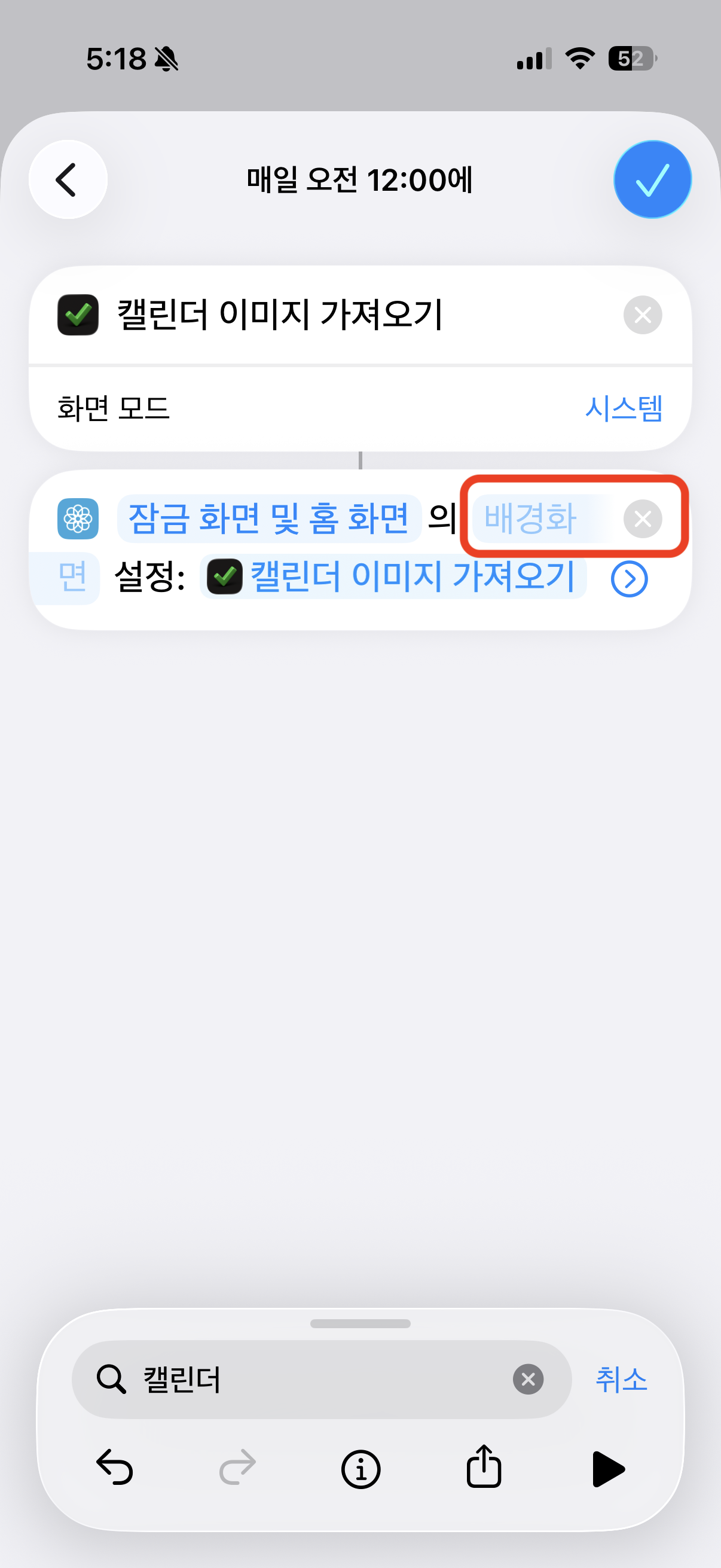
Go to Settings > Wallpaper > Add New Wallpaper, select Photos, choose an image, and tap Set as Wallpaper Pair. After setting a photo wallpaper, return to Shortcuts automation and the Wallpaper field will be enabled.
Go to Settings > Wallpaper > Add New Wallpaper, select Photos, choose an image, and tap Set as Wallpaper Pair. After setting a photo wallpaper, return to Shortcuts automation and the Wallpaper field will be enabled.
2 Daily app doesn't appear when searching in the Shortcuts app
If the Daily app doesn't show up when searching for actions in the Shortcuts app, try opening and closing the Daily app several times, then force quit and reopen the Shortcuts app. This helps iOS refresh the list of available shortcut actions. You may need to repeat this process a few times before the Daily actions appear.
Looking for step-by-step guides? Check out our tutorials .